

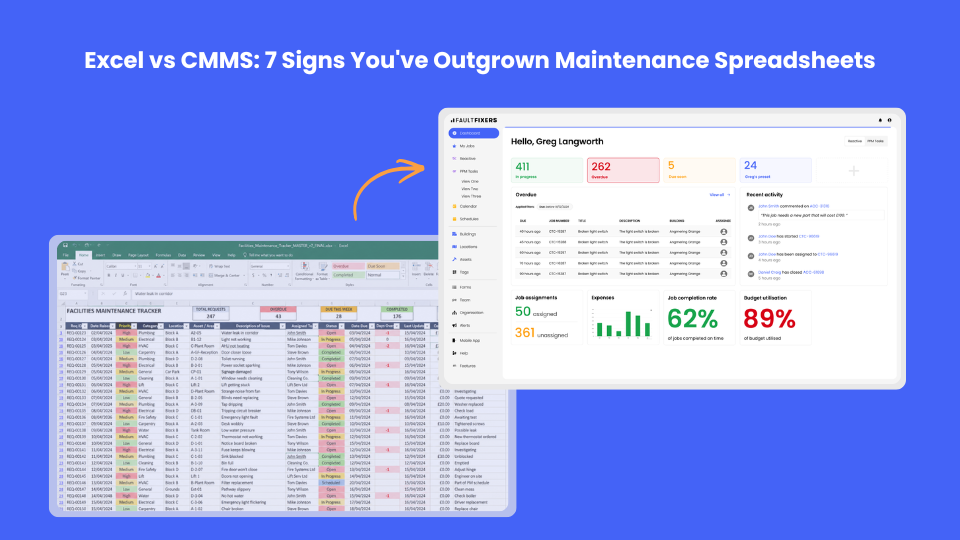
For many organisations, Excel is where maintenance management begins. It's familiar, readily available and inexpensive. Whether you're tracking planned maintenance, logging reactive jobs or maintaining an asset register, spreadsheets can be an effective starting point.
However, as your organisation grows, so do the challenges. More assets, more maintenance requests, more technicians, stricter compliance requirements and increasing expectations around reporting all place greater demands on your maintenance processes.
At some point, the spreadsheet that once kept everything organised becomes the very thing slowing your team down.
In this guide, we'll explore seven clear signs that your maintenance operation has outgrown Excel and explain why dedicated CMMS (Computerised Maintenance Management System) software provides a more scalable, efficient solution.
There are good reasons why Excel has become the default maintenance tool for countless organisations.
It allows teams to:
For small operations with only a handful of assets, spreadsheets can work reasonably well.
The problem isn't that Excel is bad.
The problem is that it wasn't designed to manage maintenance operations.
Unlike dedicated maintenance software, spreadsheets don't automatically track work orders, notify engineers, maintain audit trails or provide real-time visibility across multiple sites.
Eventually, the cracks begin to appear.
One of the biggest warning signs is the amount of administrative work required just to keep your spreadsheet accurate.
Every maintenance request means someone needs to:
Instead of improving efficiency, maintenance teams often spend hours each week maintaining the spreadsheet itself.
A CMMS automates much of this process by updating work orders, asset histories and maintenance schedules automatically. This reduces administrative overhead and allows teams to focus on completing work.
As job volumes increase, spreadsheets quickly become difficult to manage.
Common problems include:
Without a centralised system, it's easy for work to fall through the cracks.
Dedicated work order software ensures every request follows a defined workflow, from reporting and assignment through to completion and sign-off. This provides complete visibility throughout the process.
Preventive maintenance is one of the biggest areas where Excel starts to struggle.
You may begin with a calendar of recurring tasks, but as asset numbers increase, so does the complexity.
Questions quickly arise:
Keeping this information accurate across multiple spreadsheets becomes increasingly time-consuming.
A CMMS automatically schedules recurring maintenance, generates work orders and provides reminders before tasks become overdue.
This helps reduce reactive maintenance, extend asset life and improve compliance.
Whether you're responsible for schools, healthcare, commercial property, manufacturing or housing, maintenance records often play an important role during inspections and audits.
With spreadsheets, preparing for an audit can involve hours, or even days, of gathering information from multiple files.
Questions like these become difficult to answer quickly:
Modern CMMS software stores every activity against each asset, creating a complete digital audit trail that's available instantly whenever it's needed.
If your maintenance spreadsheet is shared between several people, you've probably encountered at least one of these situations:
Version control quickly becomes a major challenge.
Cloud-based maintenance software eliminates this problem by providing a single source of truth where authorised users always access the latest live information.
Senior managers increasingly expect maintenance teams to provide meaningful insights, not just lists of completed jobs.
Typical reports might include:
Producing these reports manually in Excel often requires significant effort every month.
A CMMS generates dashboards and reports automatically, allowing managers to monitor performance in real time rather than waiting until the end of the month.
Maintenance rarely happens behind a desk.
Engineers are constantly moving between buildings, sites and assets.
Yet many spreadsheet-based systems still rely on:
Modern maintenance software allows engineers to:
This not only improves productivity but also ensures maintenance records remain accurate and up to date.
Many organisations continue using spreadsheets because they appear to be the cheapest option.
However, the true costs often remain hidden.
These include:
When these costs are considered together, maintaining spreadsheets can become significantly more expensive than investing in dedicated maintenance software.
Every organisation reaches a tipping point.
If any of the following sound familiar, it's probably time to consider moving away from spreadsheets:
Rather than replacing Excel overnight, many organisations choose to migrate gradually, starting with work order management before expanding into preventive maintenance, asset management and reporting.
FaultFixers helps organisations replace disconnected spreadsheets with a modern maintenance management platform that brings everything together in one place.
With FaultFixers, you can:
Instead of spending valuable time updating spreadsheets, your team can focus on delivering better maintenance outcomes.
Excel has helped countless organisations organise their maintenance operations, but every tool has its limits.
As maintenance responsibilities grow, spreadsheets often become difficult to manage, increasing the risk of missed work, compliance issues and inefficient processes.
A dedicated CMMS doesn't just replace your spreadsheet. It transforms the way maintenance is planned, managed and reported.
If your team is spending more time managing spreadsheets than maintaining assets, it may be time to make the switch.
If you'd like to see how FaultFixers can simplify maintenance management, book a free demo and discover how a modern CMMS can help you improve efficiency, reduce downtime and gain complete visibility over your maintenance operation.

.png)


