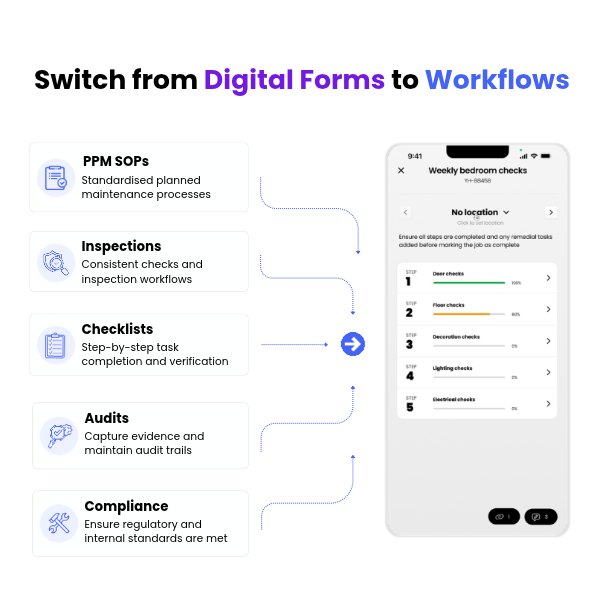
What are Workflows in FaultFixers?
Workflows are a smarter way to manage maintenance tasks and inspections. They guide operatives through each step of a job, ensuring important checks, questions and inspections are completed consistently and in the correct order.
How are Workflows different from Forms?
Workflows are the next evolution of Forms in FaultFixers. Instead of manually attaching Forms to jobs, Workflows are built directly into the job completion process. This means fewer missed checks, more consistent inspections and less admin for your team.
What happens to existing Forms?
Your existing Form templates will automatically be transferred into Workflows, so there's no need to recreate them. Previous Form submissions will also be converted into PDFs and attached to their relevant tasks, keeping your historical records accessible.
Can I create my own Workflows?
Yes! You can create and customise Workflows using the Workflow Builder in FaultFixers. Add questions, instructions, required fields, images, file uploads and signatures to build a process that suits your organisation's needs.
Can Workflows be automatically assigned to jobs?
Yes. Using Auto Rules, you can automatically assign the right Workflow when a job is created. You can also automate other details, such as job priority, ownership and due dates, helping your team save time and reduce manual admin.
How do Workflows help with compliance?
Workflows help ensure essential checks aren't overlooked. Required questions must be answered before a job can be completed, while timestamped responses provide a clear audit trail of who completed each step and when.
Can remedial tasks be raised during a Workflow?
Yes. If an issue is identified during an inspection, operatives can raise a remedial task directly within the Workflow. They can then continue their inspection without switching screens or interrupting their progress.