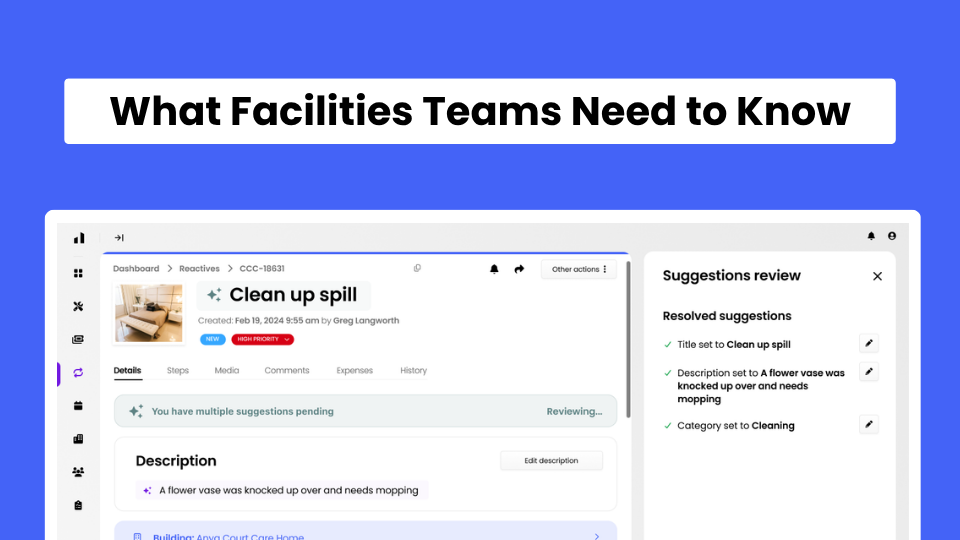
Facilities management software helps organisations manage maintenance, assets, work orders and other day-to-day facilities activities in one place.
For facilities teams, that can mean replacing a mixture of spreadsheets, emails, paper records and disconnected processes with a central system that shows what needs doing, where, when and by whom. But choosing facilities management software isn't always straightforward. Terms such as CAFM and CMMS are often used interchangeably. Different systems offer very different functionality, and the most complex platform isn't necessarily the best one for your organisation.
This guide answers 15 of the most common questions about facilities management software, from what it actually does to how to decide whether you need it.
Facilities management software is a digital system used to organise and manage information about buildings, assets, maintenance tasks and facilities operations. It gives facilities teams a central place to manage work that might otherwise be spread across spreadsheets, emails, paper forms and separate systems. Depending on the software, this can include:
In practical terms, facilities management software should help a team understand what needs doing, where it needs doing, who is responsible and whether it has been completed. The UK Government's Facilities Management Standard describes Computer-Aided Facilities Management (CAFM) systems as providing facilities managers with tools to track, plan, manage and report facilities information.
Facilities management software turns everyday facilities activity into a trackable workflow.
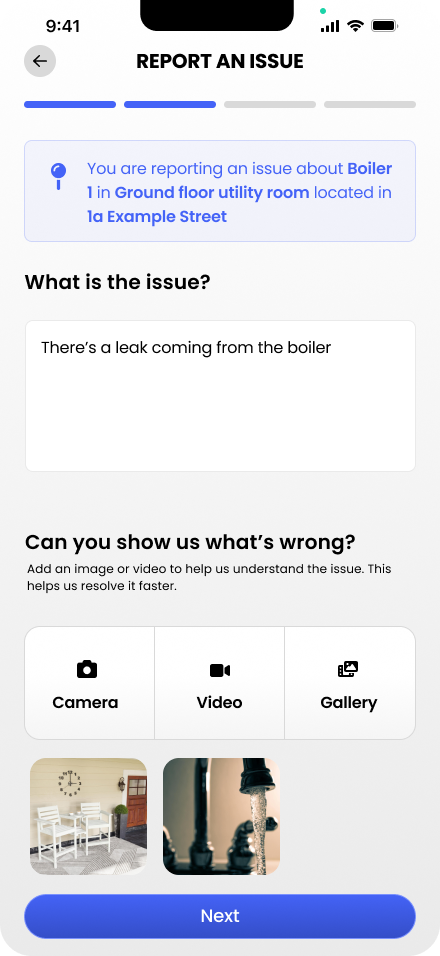
Take a leaking tap as a simple example.
Without a dedicated system, somebody might email the facilities team. That email might then be forwarded to a maintenance technician or contractor. Updates happen through more emails, and the final repair may be recorded in a spreadsheet if it's recorded at all.
With facilities management software, the process can instead look like this:
The same principle applies to planned work. Instead of somebody remembering that an inspection is due, the task can be scheduled in advance and recorded when completed. That central record is one of the main reasons organisations introduce facilities management software.
CAFM, CMMS and EAM are related categories of software, but they traditionally have different areas of focus.
The distinction is less clear than it once was. Modern CAFM products can include extensive maintenance and asset management functionality, while CMMS and EAM platforms can offer many features useful to facilities teams. In general, a CMMS focuses on maintenance, CAFM focuses on facilities operations, and EAM takes a broader approach to managing assets throughout their lifecycle. That means you shouldn't choose a product based purely on whether it describes itself as CAFM, CMMS or EAM. Start with the problems you need to solve and compare the actual functionality.
Facilities management software is useful when managing buildings and maintenance has become too complex for informal processes.
It can be used by facilities managers, estates teams, maintenance managers, property managers, operations teams, technicians and contractors.
Typical organisations include:
Size isn't the only factor. A relatively small organisation with several buildings, significant maintenance requirements or important inspection schedules may have a greater need for dedicated software than a much larger organisation with relatively simple facilities.
The exact functionality depends on the platform, but facilities management systems commonly help with five areas.
Problems can be reported, prioritised, assigned and tracked through to completion.
Recurring maintenance, inspections and servicing can be scheduled in advance.
Maintenance work can be assigned to internal team members or contractors, with progress and completion recorded.
Equipment and other assets can have individual records containing information such as location, service history and previous faults.
Checklists, photographs, certificates, documents and maintenance histories can be stored alongside the relevant work or asset.
More comprehensive systems may also cover areas such as space management, inventory, property management, energy management and workplace services.
The important question is not how many features a platform has. It's whether it covers the facilities processes your organisation actually needs to manage.
Reactive maintenance is work carried out in response to a fault or failure.
Facilities management software creates a consistent process for handling those problems.
For example, a user could report:
Location: First-floor staff kitchen
Problem: Water leaking underneath sink
Photo: Attached
Priority: Requires attention
The facilities team receives the request, assigns it to the appropriate person and tracks it until the repair has been completed. Some systems also make the reporting stage easier. FaultFixers, for example, allows organisations to place QR codes on assets or at locations. Someone who finds a problem can scan the code with their phone and report the fault without needing to find the right person or email address. Over time, these records can also reveal patterns.
If the same asset repeatedly generates reactive maintenance requests, its history can help the facilities team investigate whether continued repairs remain sensible.
Go deeper: Reactive Maintenance: Common Questions Answered
Planned preventive maintenance (PPM) means carrying out maintenance or inspections according to a planned schedule rather than waiting for something to fail.
Facilities management software can create recurring tasks for that work.
For example:
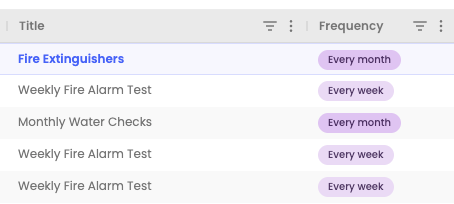
When work becomes due, the system provides the team with a record of the required task. Once completed, the result can be recorded against the relevant asset or location. This gives facilities teams visibility of what's coming up, what's completed and what's overdue without maintaining multiple manual schedules. The appropriate maintenance frequency should come from relevant legal requirements, manufacturer guidance, risk assessments and the organisation's maintenance strategy, not simply from the software.
A maintenance work order is a record of work that needs to be carried out.
A useful work order will usually answer questions such as:
Work orders create consistency. Rather than maintenance requests existing in emails, messages, conversations and people's memories, each job follows a defined process from request to completion. Once closed, the work order can also become part of the maintenance history for the building or asset.
Facilities management software can provide an asset register: a structured record of the physical assets an organisation needs to maintain.
An asset record could include:
This becomes particularly useful when maintenance information is connected to the asset. Imagine an air-conditioning unit develops another fault. Instead of simply seeing the latest problem, the facilities manager could review its previous work and discover that the same unit has required several repairs over the past year. That information can support a better-informed repair-versus-replacement decision. The UK Government's FM Asset Data Standard similarly emphasises maintaining accurate asset information and understanding the condition and maintenance requirements of FM assets.
Facilities management software can support compliance processes, but software itself does not make an organisation compliant.
Its role is to help teams plan work and retain evidence.
Depending on the organisation and the applicable requirements, records might include:
A system can also make overdue or upcoming tasks easier to identify. That matters because having a maintenance requirement written in a spreadsheet is very different from being able to demonstrate what work was completed, when and by whom. The legal and regulatory requirements themselves still need to be identified and understood by the organisation and, where appropriate, competent specialists.
Yes. Multi-site facilities management software allows several buildings or locations to be managed through the same system.
For example, a facilities manager responsible for 20 sites could view maintenance activity across the organisation and then drill into an individual building.
That makes it possible to compare questions such as:
Individual site teams can still work with their own maintenance activity while management retains central visibility. This is particularly useful for organisations such as care groups, schools, hotel groups, retail businesses and property managers where the same processes need to work across several locations.
It can, but not every facilities team needs to abandon spreadsheets.
Excel can be perfectly adequate for a simple maintenance operation. It's flexible, familiar and capable of storing a lot of information.
The problems usually appear as the operation becomes more complex.
For example, you might end up with:
PPM Schedule.xlsx
Asset Register FINAL.xlsx
Maintenance Jobs 2026.xlsx
Contractor List.xlsx
Compliance Tracker FINAL v3.xlsx
Each spreadsheet might work individually. The problem is managing the process between them. Dedicated facilities management software becomes more valuable when you need multiple people to report, assign, update and review maintenance information through the same workflow. A useful rule is this:
If your team is spending significant time managing the maintenance system rather than managing maintenance, the process probably needs reviewing.
There isn't one standard price for facilities management software.
Pricing models can be based on:
Simple cloud-based systems and enterprise FM platforms can therefore have very different costs. When comparing providers, don't look only at the headline monthly price. Ask what happens as you add users, buildings or functionality, and whether there are separate costs for onboarding, implementation, training, integrations or support. You should also consider the cost of the process you're replacing. If somebody spends hours every week updating spreadsheets, chasing maintenance updates and manually producing reports, that administrative effort has a cost too.
Start with your workflows rather than a feature checklist. Write down the problems you need the software to solve.
For example:
Ease of use matters too. Facilities software only creates useful data if people actually use it. A sophisticated platform that technicians, contractors and building users avoid can create more problems than a simpler system that becomes part of everyday operations.
Ask the provider to demonstrate real tasks rather than simply showing you dashboards and feature lists.
Give them scenarios from your own operation.
For example:
“A member of staff has found a leaking tap. Show me exactly how they report it.”
Then ask:
“What does my facilities team see?”
“How do I assign the job?”
“How does the person carrying out the repair update it?”
“Show me the completed maintenance record.”
Then do the same for planned maintenance:
“Show me how I schedule an inspection every three months and identify it if it becomes overdue.”
And for an asset:
“Show me how I find every maintenance job completed on this asset during the past two years.”
You'll learn far more from those workflows than from a provider telling you that the product has “advanced work-order management”.
You should also ask:
The objective isn't to find the system with the longest feature list. It's to find one that makes your facilities operation easier to manage.
The easiest way to choose facilities management software is to start with the problems you're trying to fix.
If maintenance requests are being lost, you need a better reporting and work-order process.
If planned maintenance is difficult to track, you need scheduling and clear visibility of upcoming and overdue work.
If asset information is fragmented, you need a central asset register connected to maintenance history.
And if you're responsible for several buildings, you may need a system that provides both individual site management and organisation-wide visibility.
Once those requirements are clear, terms such as CAFM and CMMS become less important. You can compare systems based on whether they actually support the way your facilities team needs to work.
If you're currently managing facilities through spreadsheets, email and paper records, you can try FaultFixers for free or book a demo to see how your existing maintenance workflows could work in one system.