

We’ve introduced Workflows to standardise how maintenance jobs are completed in FaultFixers. Reusable templates embed required questions and steps directly into jobs, guiding operatives through PPM, inspections and reactive maintenance while giving managers clearer oversight.

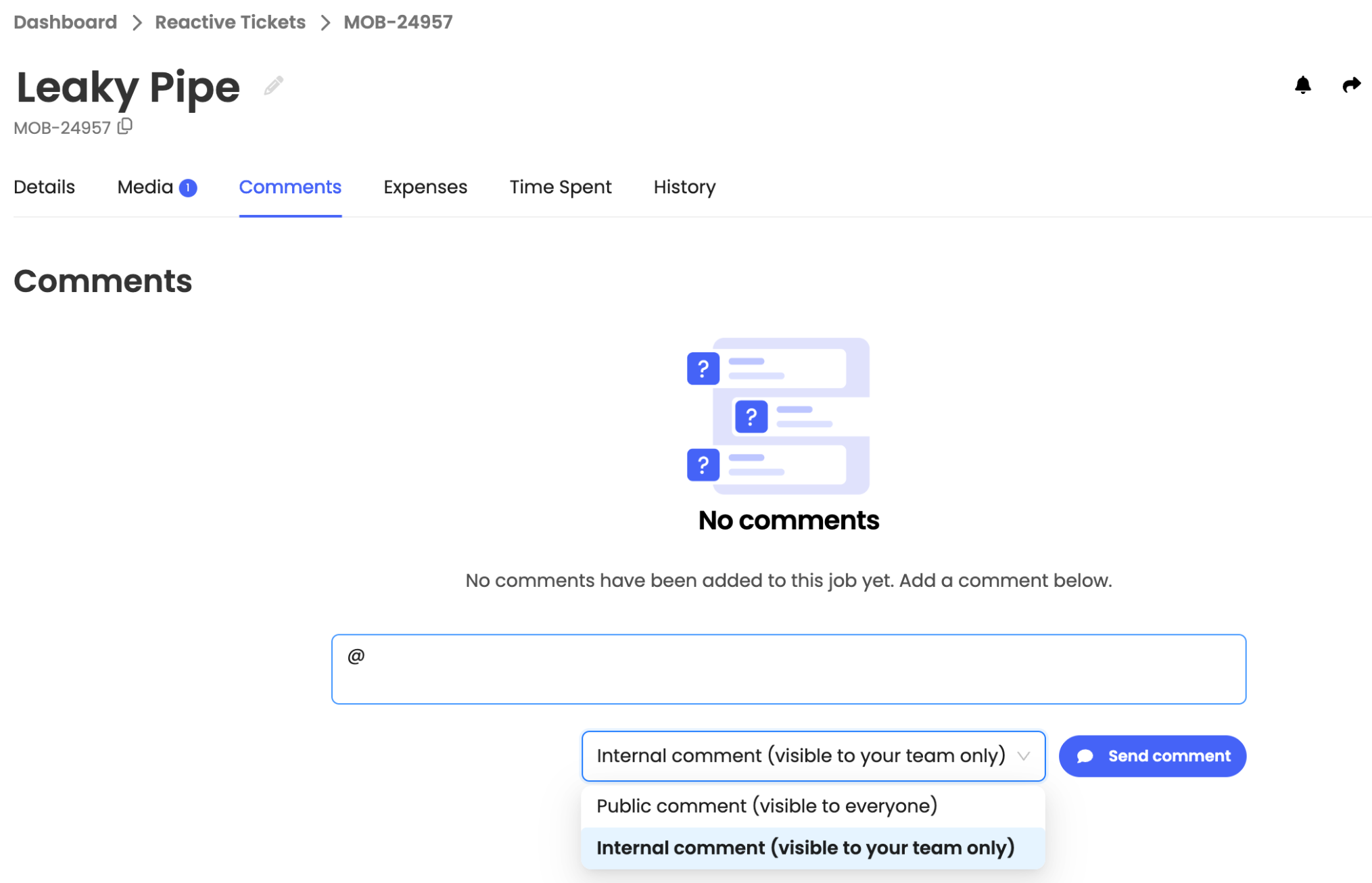
We’ve added @tagging to ticket comments so you can bring the right team members into the conversation. Type @ in any ticket’s comment box, select a team member and post your comment.
We’ve added AI-suggested remedial jobs for Scale accounts. AI analyses documents linked to a ticket to identify potential follow-up work. Review suggestions, edit details and approve or dismiss them before creating jobs.

We’ve added a Region field to buildings to help organise your portfolio by geographical area. Add or update a building’s region directly from its details.

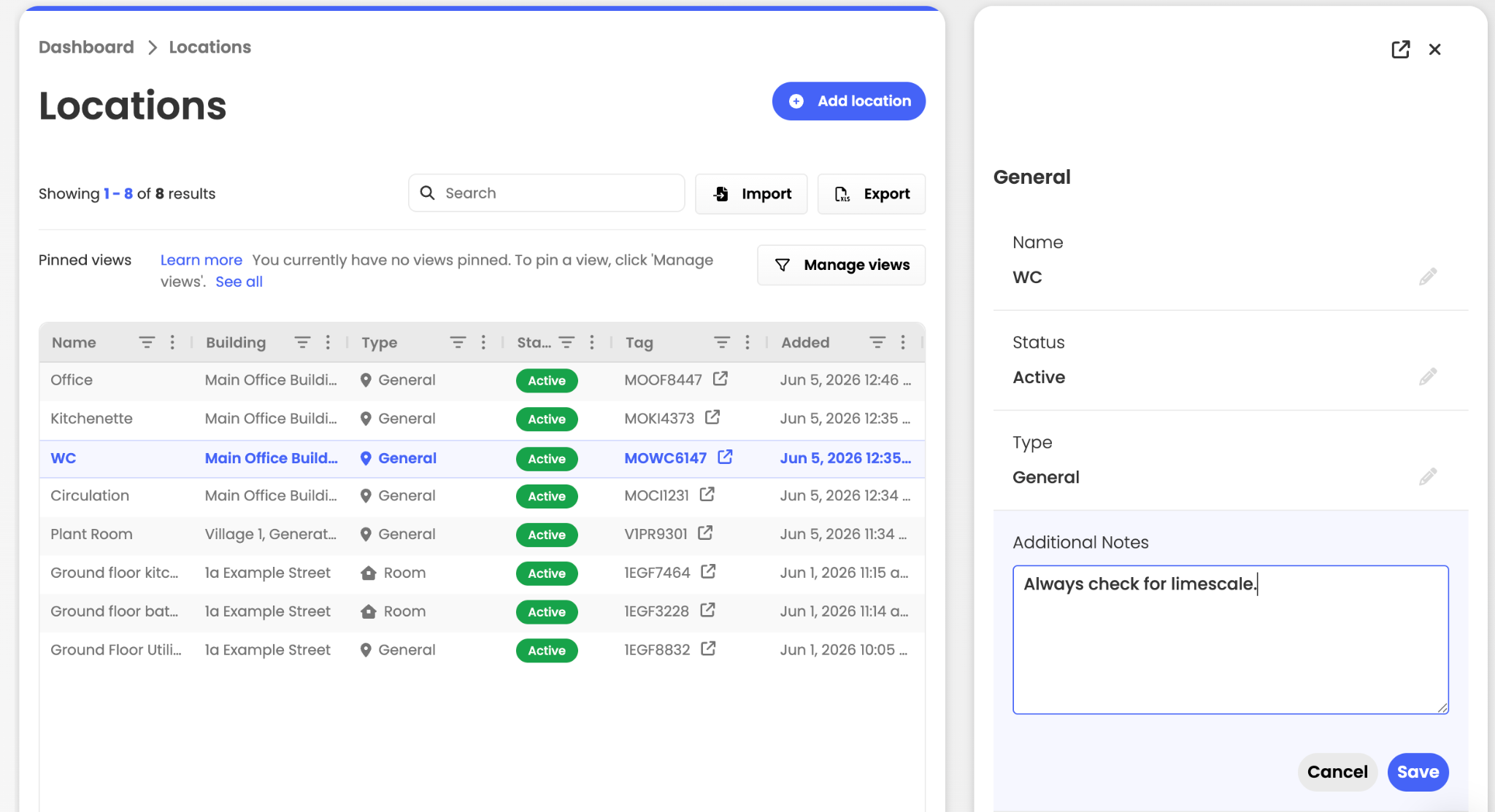
We’ve added notes and file attachments to individual locations so teams can keep instructions, access details and other useful context alongside the location they’re working at.
This article just scratches the surface of what’s possible with FaultFixers. For more information, check out our Help Center.
And if you’re not yet a FaultFixers customer and want to see what it can do for your organisation, book a demo today.
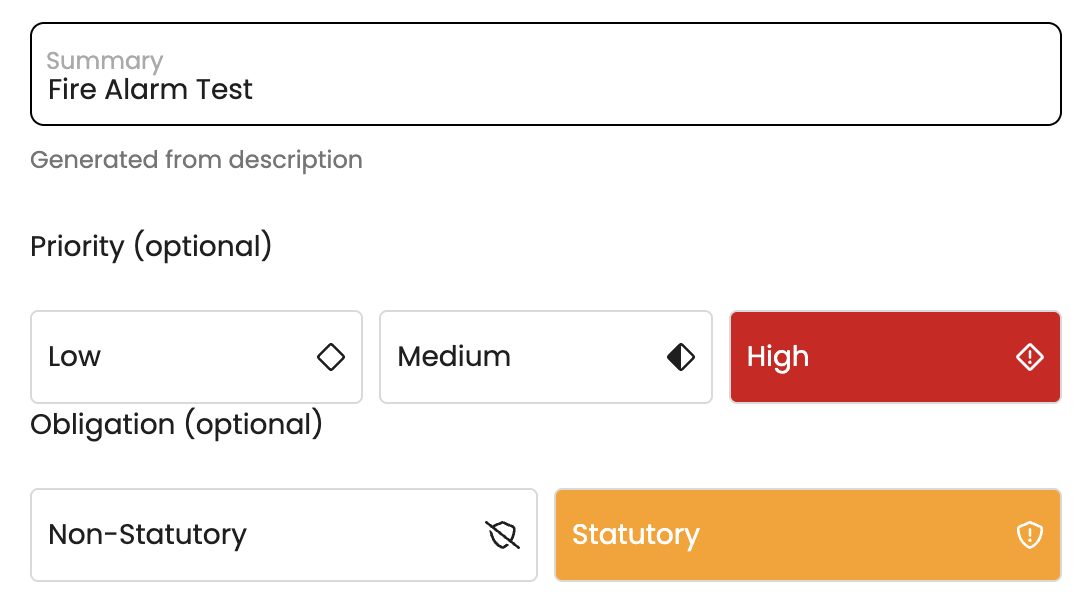
PPM tasks can now be classified as Statutory or Non-Statutory when they’re created.
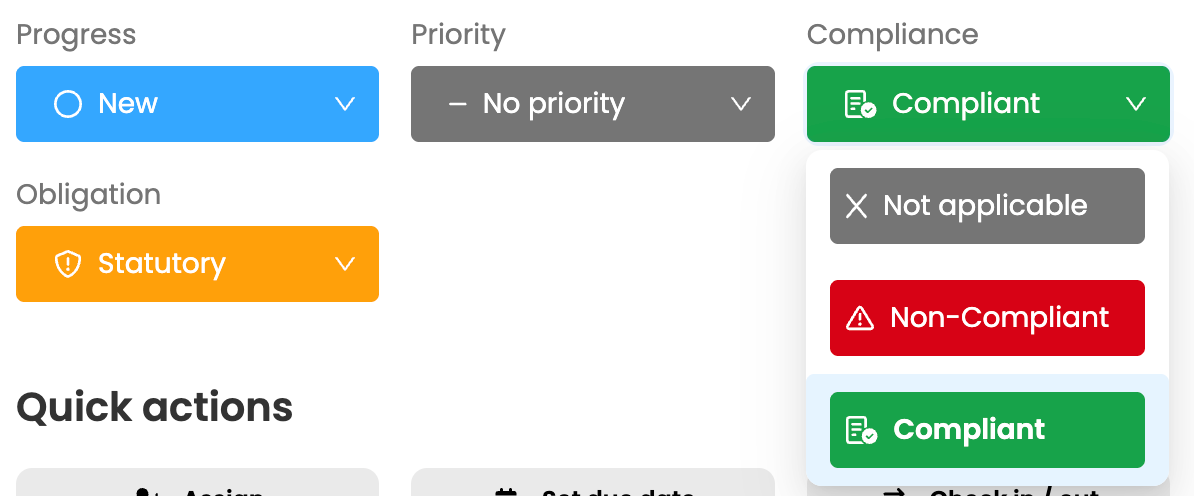
To support compliance tracking, a compliance rating must be recorded before a Statutory task can be closed.
Obligations are also displayed in the PPM schedule, where columns can be sorted and filtered to help you quickly find and review the tasks you need.
Labels can now be applied when creating a PPM task, making it easier to categorise and manage work from the outset. Use labels to identify tasks as Internal or External, or to highlight additional requirements such as permits and certifications. New Internal/External and Statutory/Non-Statutory views also allow you to quickly sort, filter and access the relevant tasks.

The Job Details page has been updated with a clearer, more intuitive layout. Tabs now appear directly beneath the job title, improving the page hierarchy and creating a navigation experience that is consistent with Pane View.
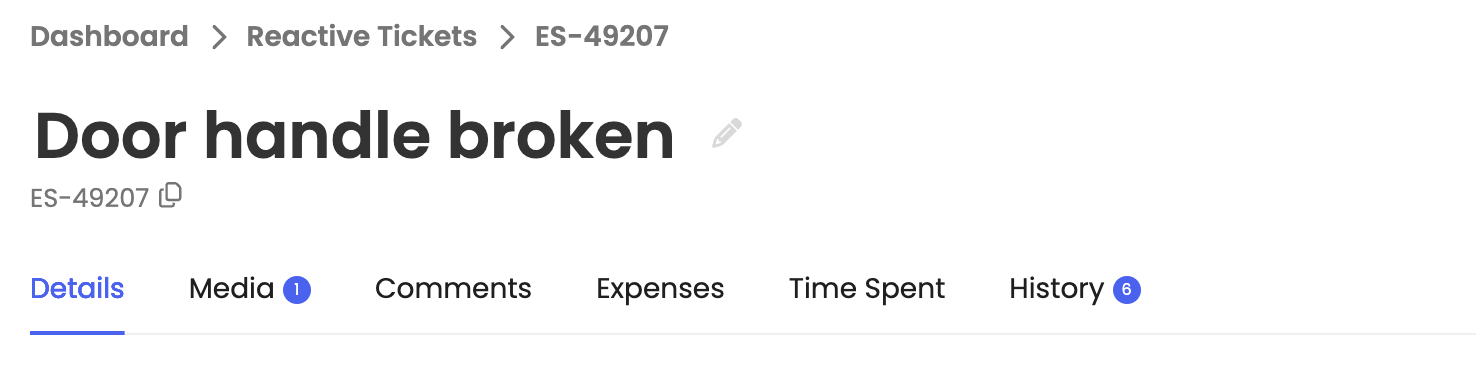
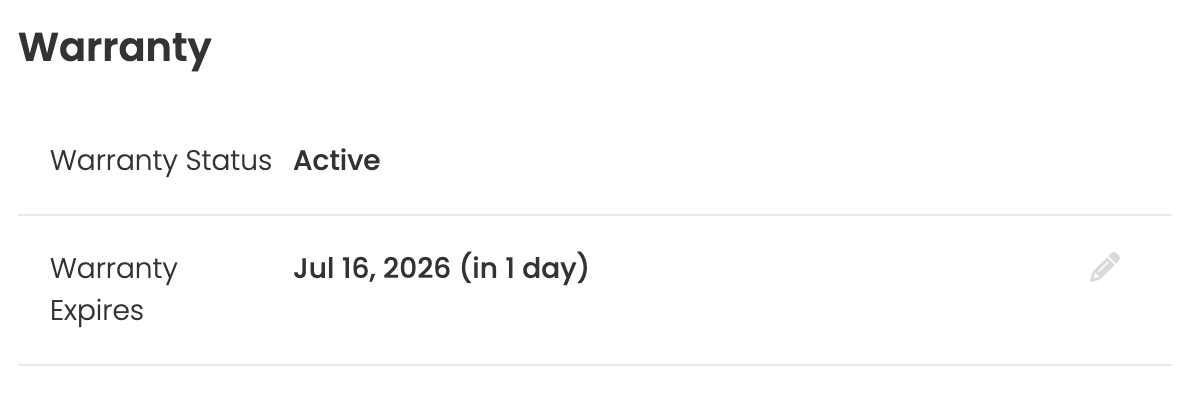
Email notifications are now available for key stages in an asset’s lifecycle, including when:
These notifications give teams more time to review, renew or replace assets before important dates are missed. Notification preferences can be managed in the Notification Centre within Account Settings.
A custom privacy notice can now be added to the Reporter App and displayed before a task is reported. Use the notice to explain what information should or should not be included, helping prevent personal or sensitive details from being submitted. The privacy notice can be configured in the Organisation Details section.

This article just scratches the surface of what’s possible with FaultFixers. For more information, check out our Help Center.
And if you’re not yet a FaultFixers customer and want to see what it can do for your organisation, book a demo today.
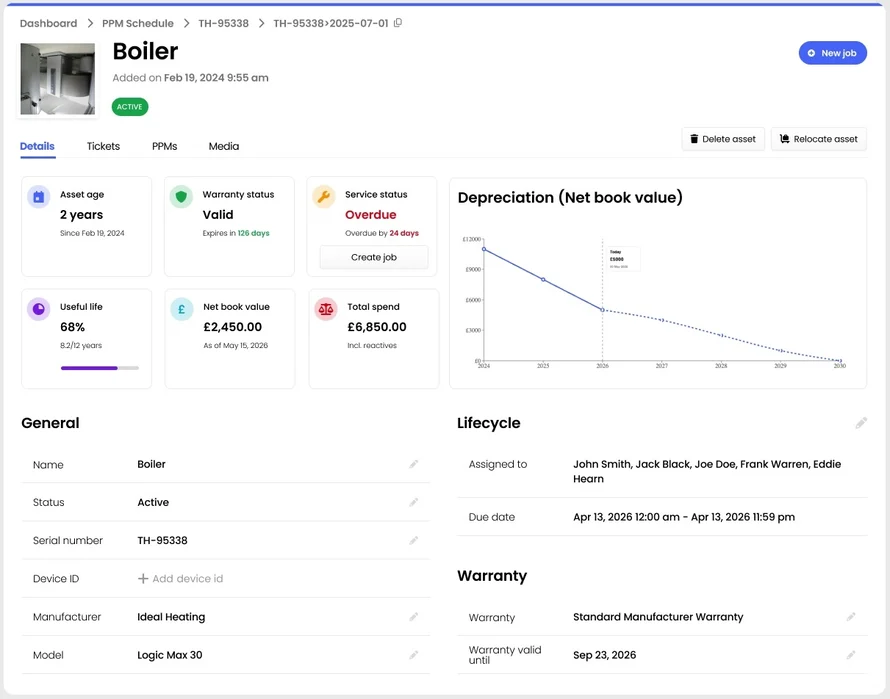
Asset management has been enhanced with updated asset fields, warranty tracking, lifecycle management, and depreciation reporting. These improvements will provide greater visibility into asset health, value, and replacement planning.
You'll be able to add Vendors directly to jobs during creation. This update will help keep vendor relationships organized and ensure external partners remain connected to the job from start to finish.
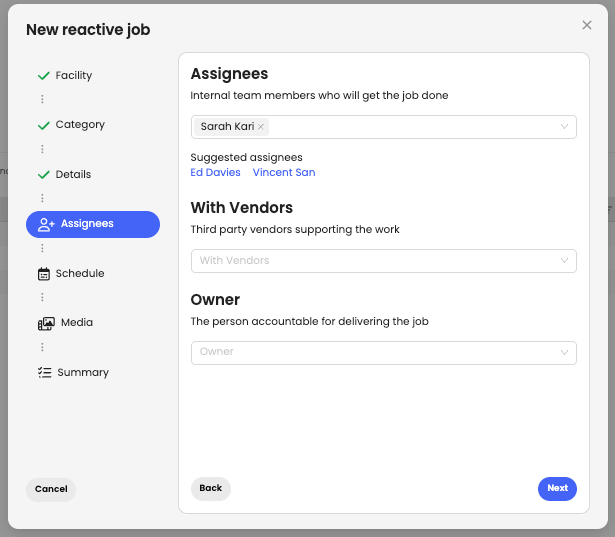
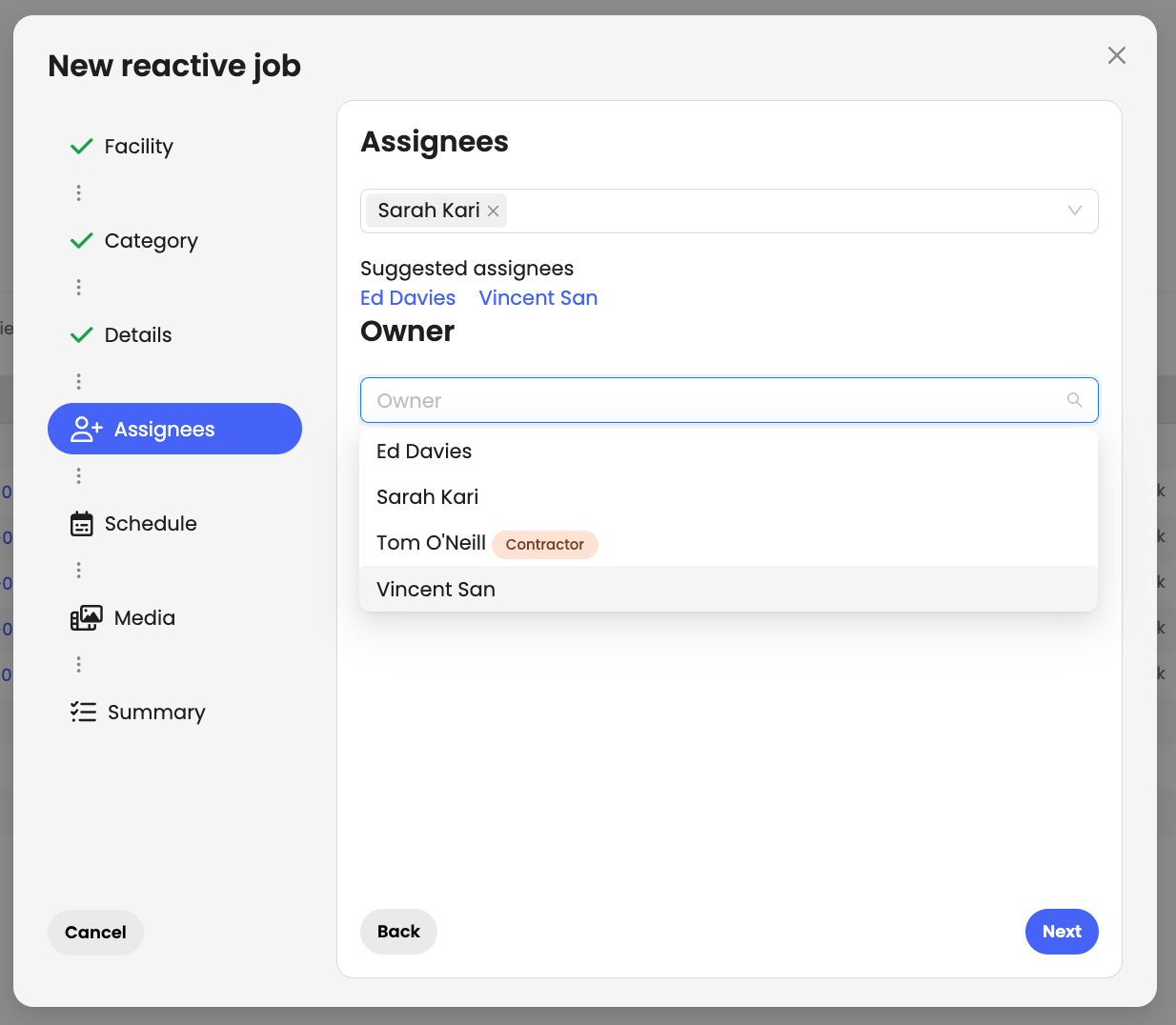
You can now assign an owner when creating or updating a job, making it clear who is ultimately responsible for its delivery. Ownership remains visible even when the job is assigned to other team members.
Stay on top of all activities at your facility wherever you are. The teams mobile app now displays recently opened and closed jobs, giving you a quick snapshot of what's happening in every premise.

We've introduced custom asset types, allowing you to tailor your asset register to the equipment and assets you manage. When creating an asset type, you can select a dedicated icon, add custom fields, and define which fields are mandatory for that category. This ensures the right information is captured every time an asset is added, helping maintain accurate, consistent, and structured asset records across your organisation.
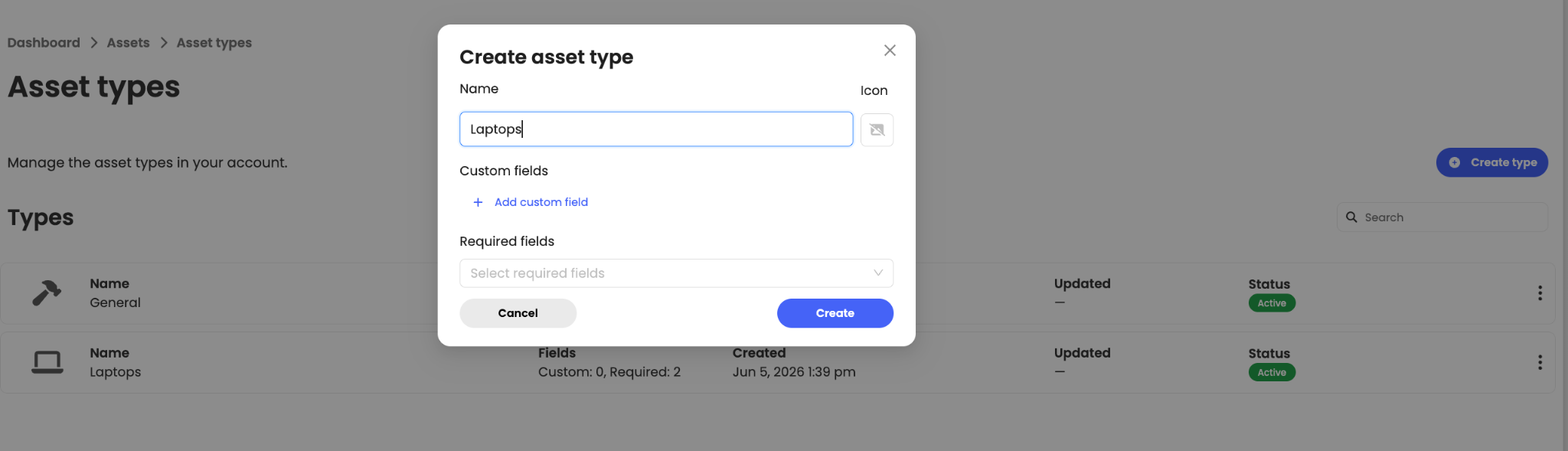
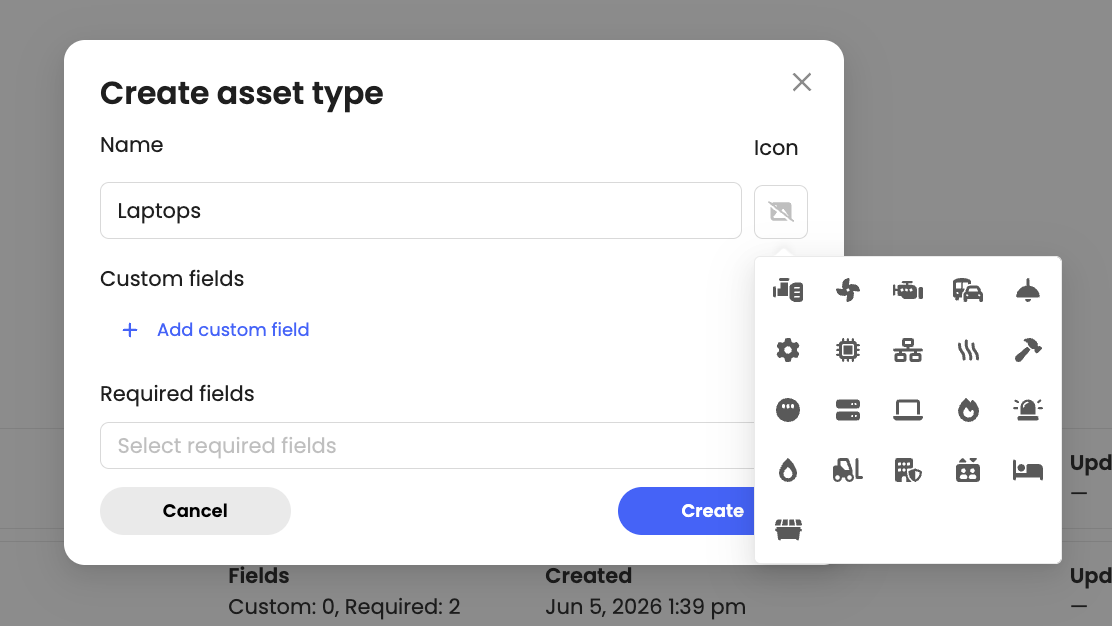
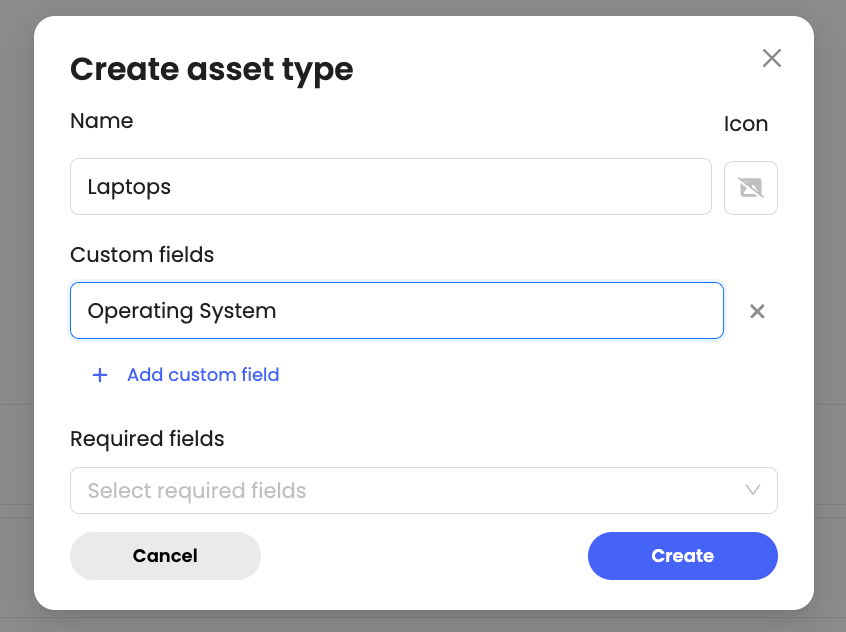
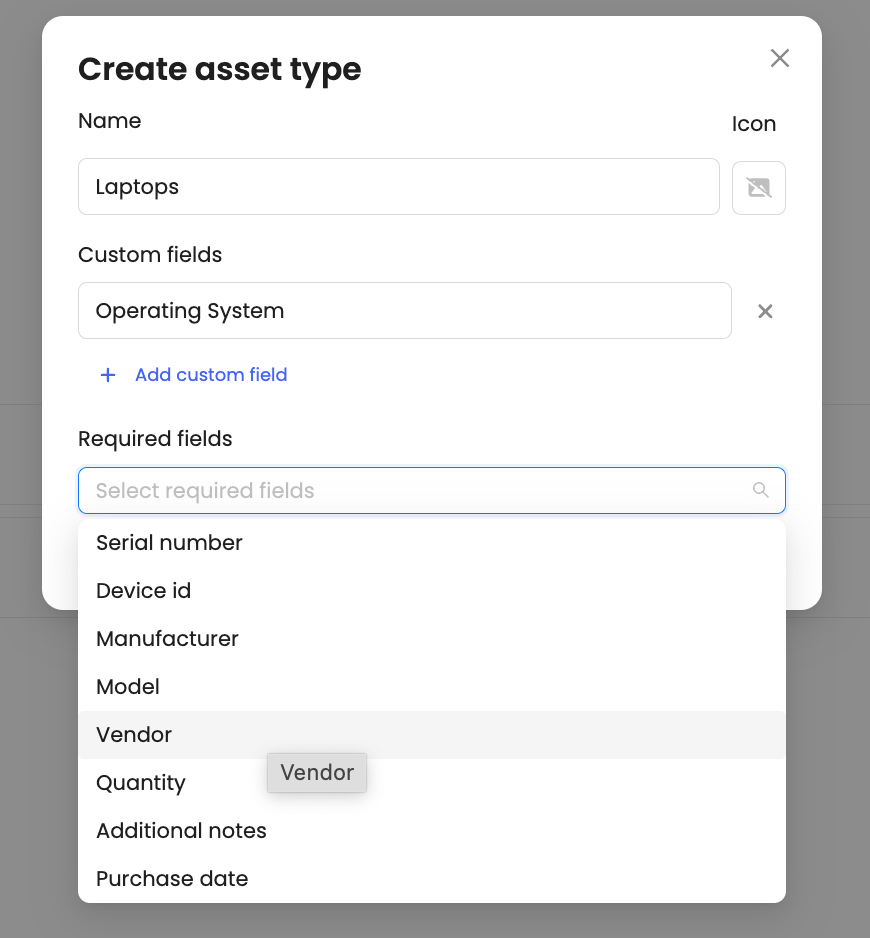
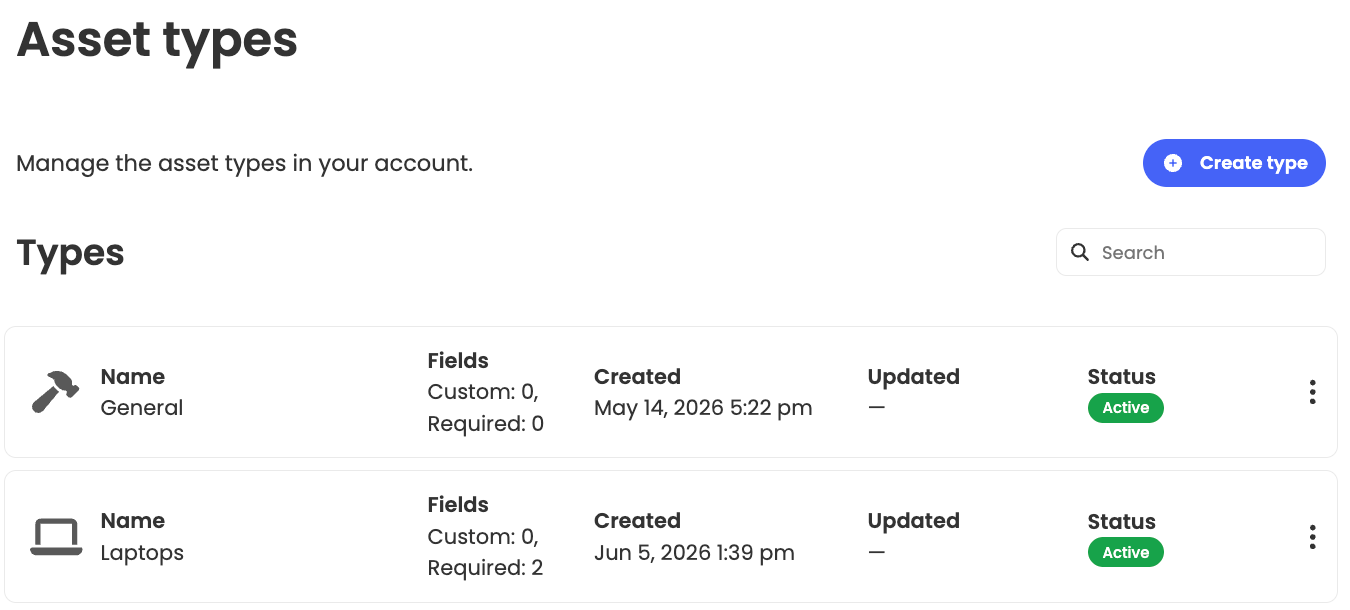
Once configured, the relevant fields will automatically appear whenever that asset type is selected, streamlining data entry and improving consistency across your asset register.
This article just scratches the surface of what’s possible with FaultFixers. For more information, check out our Help Center.
And if you’re not yet a FaultFixers customer and want to see what it can do for your organisation, book a demo today.
Closed jobs can now be marked as either Completed or Cancelled. This helps keep reporting accurate by separating finished work from jobs that no longer need to be carried out, without having to delete the tasks.

Jobs moved to On Hold now require a reason before the status can be updated. The reason will also appear as a new column in the table view, giving your team instant visibility into why work has been paused without needing to open the job. This makes it easier to track delays, improve communication, and keep everyone aligned on outstanding work.
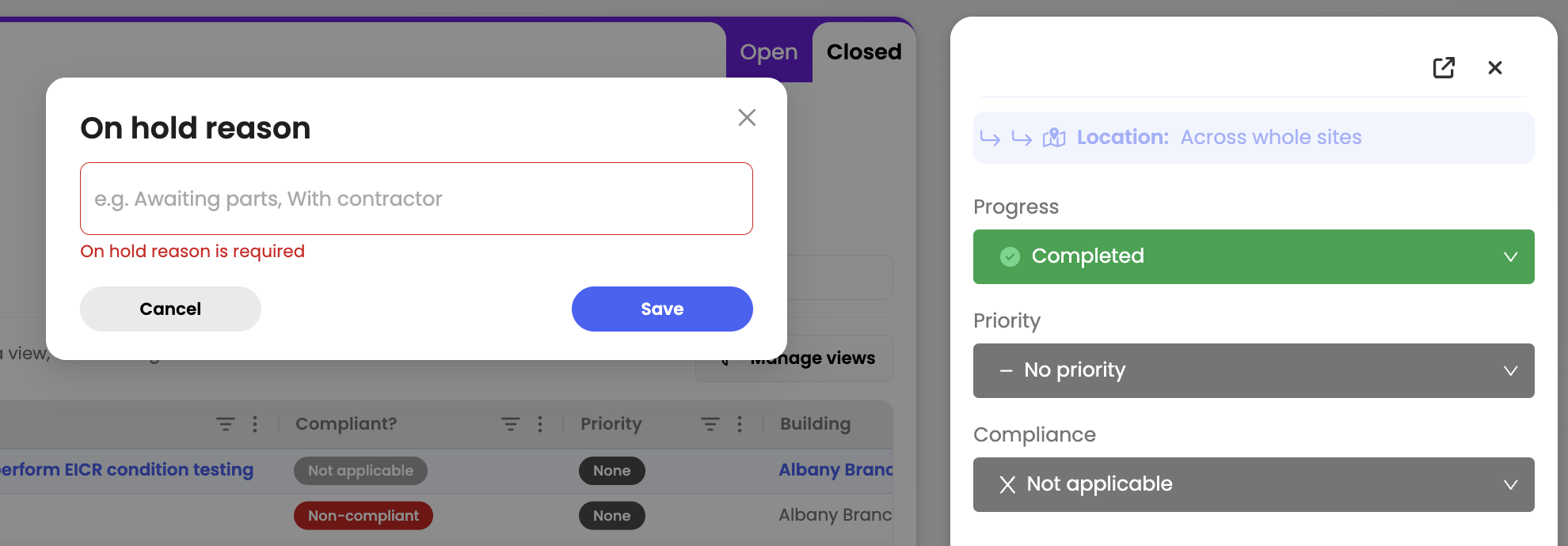
Automation rules can now be triggered based on job priority. Set conditions using Low, Medium, or High priority levels to automatically assign actions, streamline workflows, and ensure urgent jobs get the attention they need faster.

You can also set automation actions to automatically update a job’s priority based on specific conditions or categories. For example, jobs created under a critical category like alarms can instantly be marked as High priority.

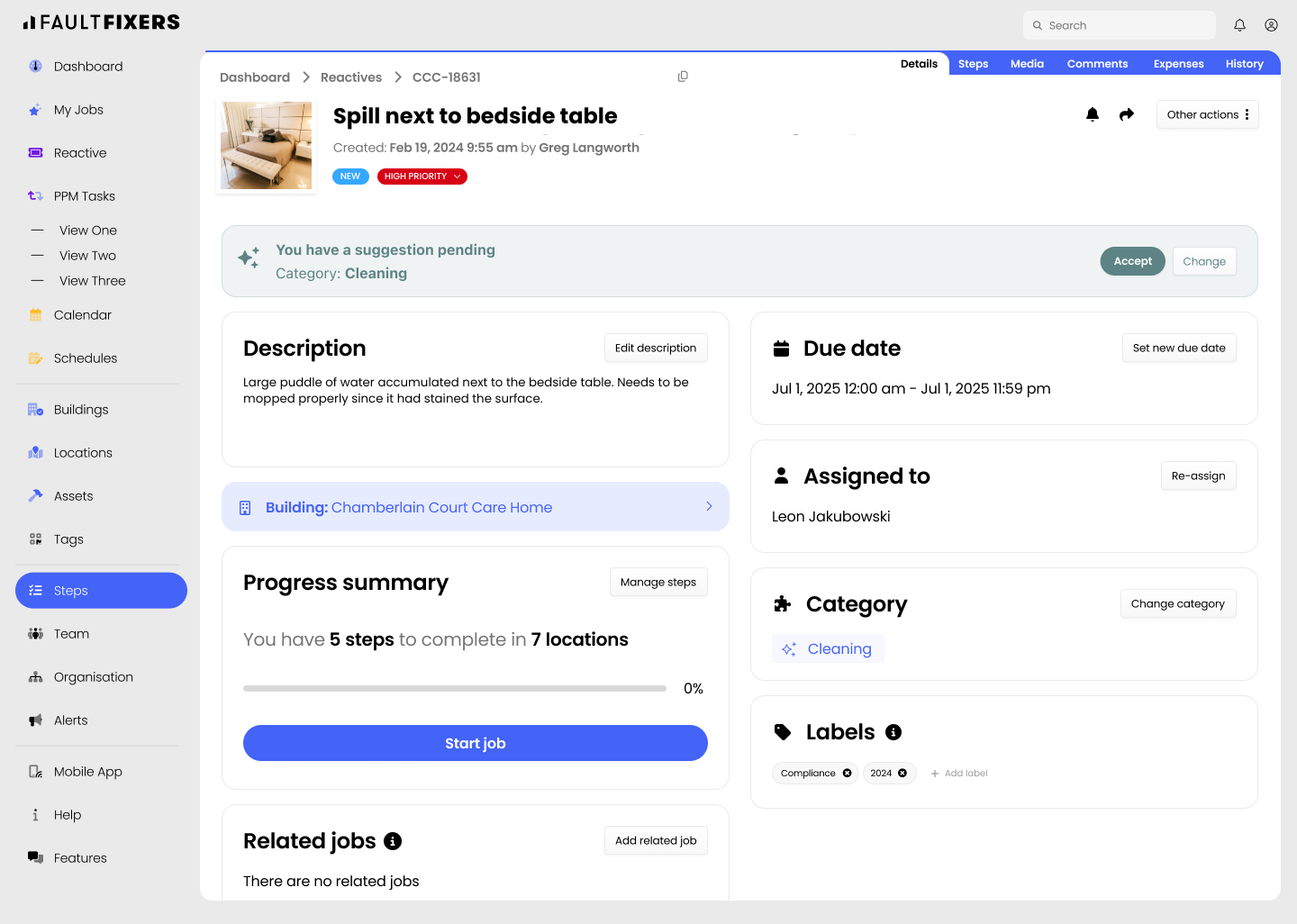
We’ve redesigned the Job Details view to make information easier to scan and navigate. Details are now grouped into clear sections like General, Assignment, Schedule, and Classification, creating a cleaner layout that helps teams quickly find the information they need while managing jobs.
.png)
This article just scratches the surface of what’s possible with FaultFixers. For more information, check out our Help Center.
And if you’re not yet a FaultFixers customer and want to see what it can do for your organisation, book a demo today.
This release introduces smarter job creation, improved PPM scheduling, enhanced sharing capabilities, and expanded pane views across the platform.
Using the job summary of reported reactive tickets we’ll suggest the most relevant options for you. This helps reporters log jobs more accurately so that they can move faster without having to fret over which category suits the job best.
We’ve introduced enhanced scheduling options for recurring PPM tasks, giving you greater flexibility and control. You can now skip specific days, automatically adjust tasks when they clash, align schedules with month-end dates, and preview upcoming occurrences before they’re created.

You can now access your tag's QR code and directly get the link to reporters for a given building. Print it out to stick it on walls, copy it, or send it via email, SMS, or WhatsApp for everyone to access it easily.

Job sharing has been improved to give you more control over the information you send. You can now select exactly which details to include when sharing a job, ensuring recipients only see the information relevant to them.

Pane view has been expanded across multiple areas of FaultFixers, providing a more consistent way to navigate and manage information. It is now available in Calendar, PPM Tasks, Facilities, Team, Vendors, Expenses, and the Time Spent tabs.

This article just scratches the surface of what’s possible with FaultFixers. For more information, check out our Help Center.
And if you’re not yet a FaultFixers customer and want to see what it can do for your organisation, book a demo today.
This release introduces improvements to job management, including a refreshed dashboard, automation rules, smarter due date scheduling, and easier linking of remedial jobs within PPM tasks.
We’ve introduced a refreshed dashboard with improved visuals and bespoke KPI insights. Monitor tickets, overdue jobs, and performance trends more easily in one place.

You can create custom rules to automatically trigger actions when you update/create a job. From assigning jobs to setting due dates, you can automate routine steps and keep work moving without manually updating them. You can also assign these rules to a specific building or category that you would like to update.

Automated due dates now take your configured working days and hours into account when scheduling jobs. This ensures deadlines fall within business hours, avoiding weekends or out-of-hours targets and helping operatives manage workloads more realistically.

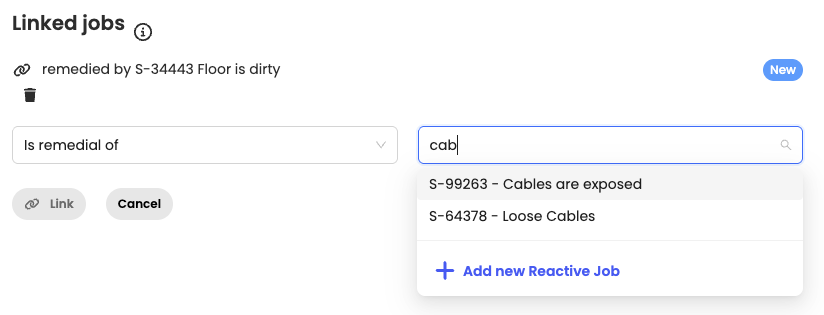
We’ve improved how remedial jobs can be raised from PPM tasks. Instead of needing to log a form, you can now create a reactive ticket and link it directly to the relevant PPM task as a remedial.
This article just scratches the surface of what’s possible with FaultFixers. For more information, check out our Help Center.
And if you’re not yet a FaultFixers customer and want to see what it can do for your organisation, book a demo today.
This release introduces a set of improvements designed to help teams manage jobs more efficiently, reduce time spent navigating the platform, and gain clearer visibility into completed work and spend.
Pane view opens a job in a side panel so you can view and update details without leaving the jobs list, enabling bulk actions and faster review. It reduces context switching and keeps workflows moving without interrupting focus. Teams can stay in flow, make quicker decisions, and complete more work in less time.
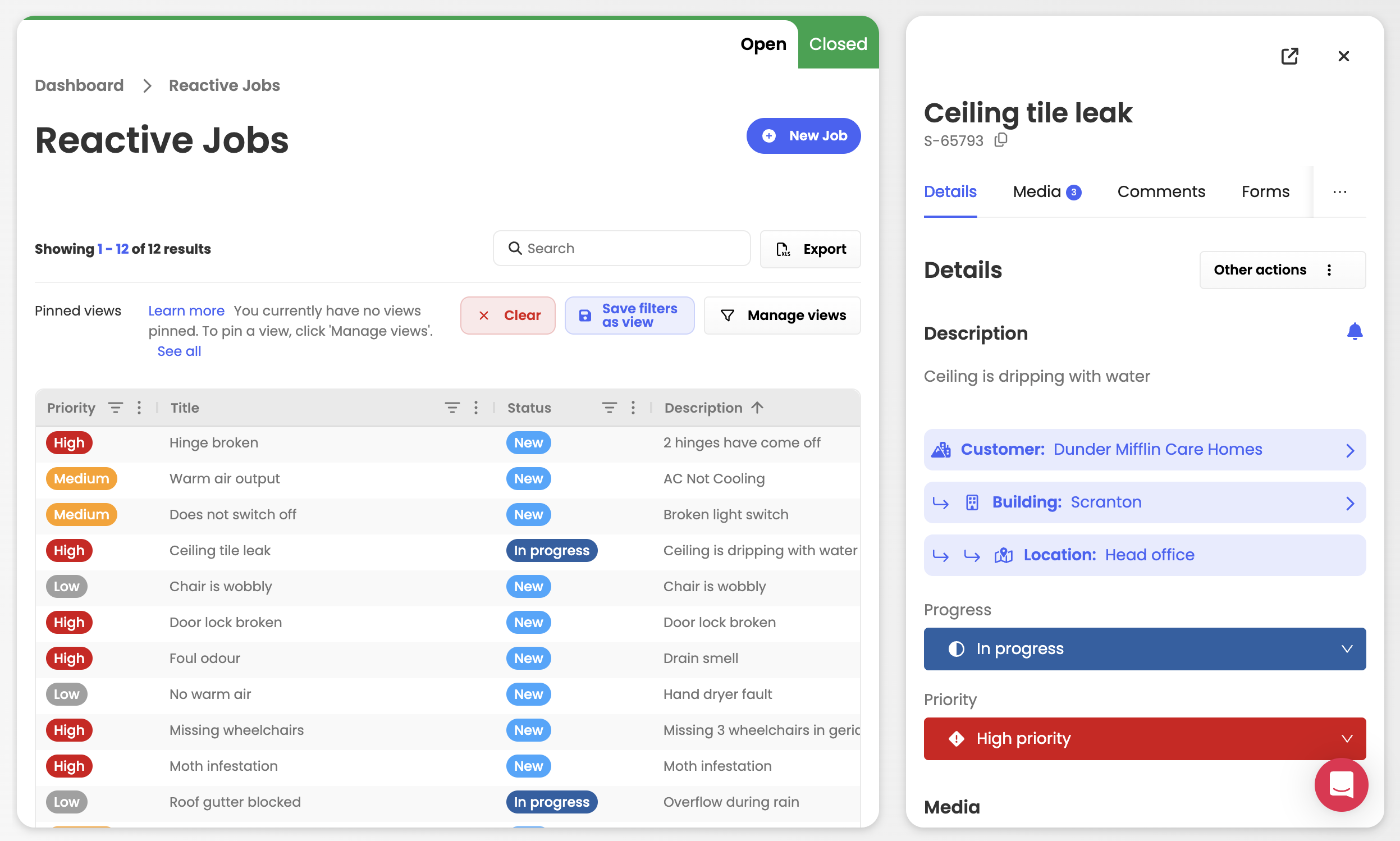
We’ve added new system views to help you quickly filter and focus on the tasks that matter most to you. These are also customised to the specific types of tasks you are viewing - Reactive vs PPMs. This helps you cut through noise and spend less time searching for what needs attention.

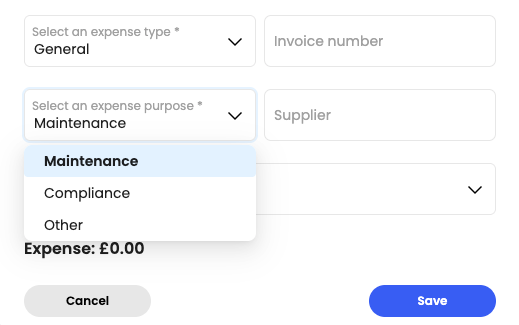
We have added in a new field which allows you to declare the purpose of the expense for every job you log on the platform. You can now easily distinguish between reactive maintenance spend vs compliance maintenance spend.
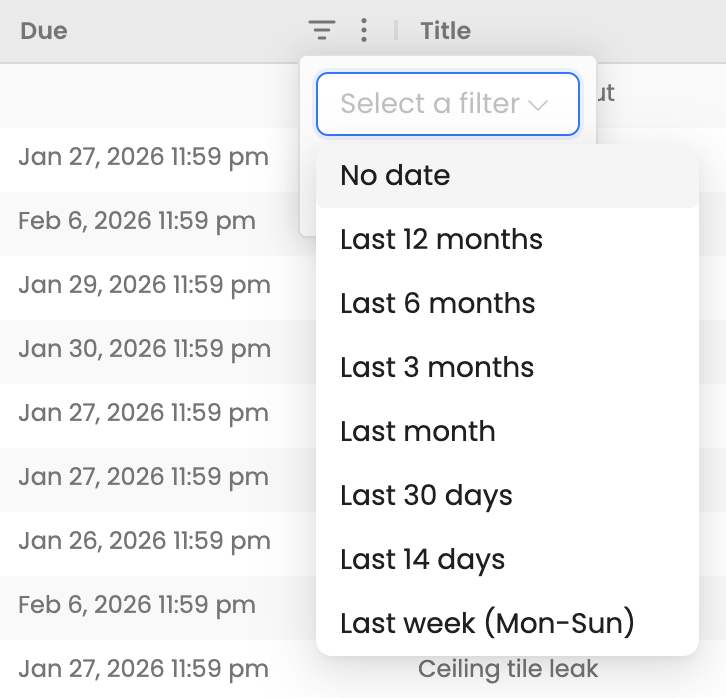
View jobs using relative date options to quickly focus on what’s due now or was in the past year. This helps you quickly review recently completed work or look back over historical jobs without manual date ranges. Ideal for auditing completed jobs, tracking recent activity, and reviewing past performance.
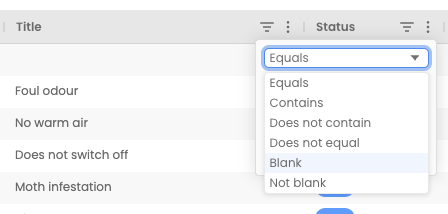
You can now filter tables by Blank values, allowing you to quickly find records with missing or incomplete fields. This makes reviewing, cleaning up, and completing data faster, especially in larger tables.
This column helps you to identify the uploaded file (e.g., image, video, document) and its file format (e.g., JPG, MP4, PDF) under the media tab. This features makes it easy to locate a specific file you are looking for on the platform.
You can now assign vendors to each PPM task making it easier to track responsibility.
This article just scratches the surface of what’s possible with FaultFixers. For more information, check out our Help Center.
And if you’re not yet a FaultFixers customer and want to see what it can do for your organisation, book a demo today.
Auto Assignment: Auto Assignment is the latest FaultFixers feature to be launched and it makes maintenance management
Auto Assignment: Auto Assignment is the latest FaultFixers feature to be launched and it makes maintenance management a breeze. Use the auto-assignment feature to automatically assign tickets and tasks to the right team members. If George is in charge of the West Building, simply create a rule and any future West Building tickets will be automatically assigned to George. You have the ability to automatically assign all tickets, categories or buildings.

Media & History Tab: Last month, we simplified the Tickets view by adding additional tabs to help organise your data. This month, we finished it off with two new tabs 'Media' and 'History' so that finding what you need is much easier!

FaultFixers wouldn't be here with YOU and we want you to be part of our development. Our aim is to build a maintenance system that works perfectly for you, with the features you need!

We've added a 'See what's coming' button to the FaultFixers system so you can find out what's on our development roadmap and vote for ideas or add your own!
Performance improvements: We have continued to optimise the system and are happy to report even more performance improvements in this update.
Other updates
Teams App (Mobile)
Ticket tile information improvements: We have improved the look and feel of tickets in the FaultFixers Teams app.
Ticket tile information improvements: We have improved the look and feel of tickets in the FaultFixers Teams app. Scroll through all your tickets with the essential information before needing to click in.
.png)
Zoom into pictures: We're pleased to say all users now have the ability to zoom into pictures on tickets. Get all the information you need from the FaultFixers Teams app before your teams get on site.
Adding back searching for forms: We've added back the ability to search for Forms.
Addition of ppm tasks to schedule: When creating a new PPM task, you will now have the option to schedule the tasks on a future date.
Improvement to file upload UI on contractors: We've redesigned the look and feel of the file uploads section in third-party contractors. Now you can attach multiple files at once and manage all your uploads quickly and easily.

Ability to print building profile page: Last month we launched our new Building Insights for each building profile. We've had some great feedback and we love that you like it! This month, we've gone one step further and added the ability to print building profile pages.
Increase attribute tag limit to 50: The ability to include up to 50 attribute tags for any ticket or task.
Bug Fixes
Updated Building Profiles: We've added brand new KPI insights to each building profile meaning you get oversight of
Updated Building Profiles: We've added brand new KPI insights to each building profile meaning you get oversight of tickets and tasks at a glance. Dive deeper into each building with a more detailed look at Overdue Tickets, Overdue Tasks, Upcoming Tickets and Upcoming Tasks.

Addition of KPIs on each building profile so you easily navigate to the most important tasks for you and your teams. Scroll down to view all tickets and tasks related to the building in more detail and click on each instance to open up the ticket.

Addition of date range searching to improve performance: We've added a brand new way of filtering by date. Filter your data easily with monthly, weekly or yearly views plus the addition of custom date ranges to really get to the good stuff! So that you're always looking at the most relevant jobs in your reports, jobs will appear based on their creation date, their closure date and their due date.

Improve loading speed of Forms and My Schedule on FaultFixers Teams App: We've improved loading times for the Forms and My Schedule features in the FaultFixers Teams App meaning you get to important tasks and tickets quicker.
Removal of 'Other' from buildings to avoid mistakes: We removed the ‘Other’ options to avoid incorrect assignments against accounts instead of buildings.
Addition of feedback popup: We'll be looking to get as much feedback from you as possible to help shape the future of the FaultFixers app. Keep a look out for surveys or quick voting polls to help us build exactly what you need! Can't wait that long? We're always available on chat within the app to accept suggestions or to provide support.
Bug Fixes
We've launched some extra Dashboard tiles to make total oversight that much easier and quicker.
List of Overdue Tasks:
We've launched some extra Dashboard tiles to make total oversight that much easier and quicker. Now you'll be able to see a list of your most Overdue Reactive tickets and Overdue PPMs. Click on 'More' to get a full view of all your overdue tasks.

Completed Jobs:
We've also added a dashboard tile showing all of your completed jobs across time. This handy graph will be able to tell you how much is getting done and when.

Static Dashboard:
Your dashboard is now static which allows for improved responsive views on multiple device sizes as well as allowing the easy release of new dashboard tiles.
Printable Dashboard:
Your dashboard is now printable!
Get a paper copy of your dashboard showing your reactive tickets, PPMs and overdue tasks. All you need to do is hit the 'Print' button at the bottom of your dashboard which will save it as a printable PDF.

Custom Attribute Tagging:
We've added in a new custom attribute tag field for your tickets! This means you can now segment your tickets even further will custom tags such as 'Leak' or 'Legionella Testing'.
Custom Attribute Tags Column:
Along with a new field in your tickets, we have also added a new column where you will be able to view and filter all of your custom attribute tags.

Bug Fixes and UI Improvements
Your security: We’ve been applying several security patches behind the scenes, which is why you’ll have been logged out
Your security: We’ve been applying several security patches behind the scenes, which is why you’ll have been logged out of the Teams app a bit more frequently - we’ve finalised this and have taken you back to being permanently logged in.
This means you will no longer be logged out of the Teams app and will no longer need to log in again when you open the app.
We've separated reactive and PPM tickets: Reactive and PPM tickets are no longer grouped. Now, you can choose to view reactive or PPM tickets straight from the left-side menu.
We decided to separate reactive and PPM tickets for quicker access to the tickets and tasks you want to see. In PPM, you will see all of your overarching PPM tasks as we have updated the software so that tasks are now grouped by instances. See below for more details...
PPM tasks are now grouped by instances: We've made PPM even more powerful. Now you'll see all of your overarching PPM tasks first with each occurrence sitting nicely inside each ticket.
Each PPM task will show each occurrence which you can filter by ticket progress and ticket status. You will see any upcoming tasks and any overdue tasks.

New business insights tiles: We wanted to make reporting even easier by adding new insights tiles for a quick overview of overdue jobs and ticket categories. Hover over your filters for a breakdown of tickets or use the handy filters below to view what is essential to you.
You will also find a new dashboard tile for all your upcoming reactive tickets to support you and your teams day-to-day. The new business insights tiles are interactive and are designed to show a quick overview of jobs, categories and tickets. You can filter tiles by ticket priority, reactive or PPM and go in more depth by hovering over sections.

Ability to duplicate PPM tasks: Now you can easily duplicate any of your PPM tasks with a quick click of a button.
Assign team members through search: So you can navigate the app more easily, we've added collapsable ticket updates. This will allow you to personalise what's most important to you. When creating a new ticket and selecting a ticket assignee, all you need to do is start typing in the assignee name and select. Otherwise, you can select by scrolling as usual.

Bug Fixes and UI Improvements
See all your comments in one place: We've made organising your tickets and tasks much easier with the addition of
See all your comments in one place: We've made organising your tickets and tasks much easier with the addition of Comments, Forms and Expenses views and don't worry, your full ticket history hasn't moved.
Coming soon: addition of Media, Files and Audit History!

New & improved job creation wizard: Introducing the brand new ticket creation wizard! We wanted to make reporting a maintenance ticket even easier with a simple click-as-you-go wizard.
Start by creating a new ticket which will bring you to our brand new ticket creation wizard.

Fly through each step quickly and more accurately starting with buildings and locations to adding in your media. Assigning and scheduling your ticket is straightforward.
A more simplified My Jobs: Based on customer feedback, we've stripped back My Jobs to a simplified view of what to work on next.
.png)
Use the quick filters at the top to see the jobs that are most relevant to how you like to work.

More performance improvements: We are dedicated to bringing you the best overall experience with FaultFixers which is why we've prioritised more performance improvements.
Each of our feature releases aims to have your system working faster and stronger than ever before.
Other updates
Teams App (Mobile)
Desktop (web)
Coming soon:
Performance and speed improvements: We've improved loading times and overall speed across FaultFixers web.
Performance and speed improvements: We've improved loading times and overall speed across FaultFixers web.
Performance updates on mobile coming soon!
Addition of contractors tab: Introducing the brand new contractor's tab within Teams. Here you can create a listing of all of your external third-party contractors.
Coming soon: you'll be able to directly assign tickets to these third-party contractors, automatically sending them notifications and allowing them to edit and complete jobs.

In-app and web support integration: Addition of live chat for support queries and questions within FaultFixers mobile teams app and desktop. The Intercom integration will connect you to someone on the FaultFixers team to answer your support queries.
%2520(1).png)
Improved calendar view: Updated calendar view in Scheduler. UI of date picker has been improved with the option to view month, year and date.

Hiding closed tickets: Your KPIs now act as quick filters, so now if you want to view closed tickets you will need to click on ‘Closed’ to display them in your list or calendar views. This will help speed up you account if you don’t regularly view your closed tickets.

Update login page: Improved design and branding on the FaultFixers Login page.
PPM performance updates: Speed improvements within PPM have been improved by optimising the default ticket view to include 'new' and 'in progress' only.
Bug Fixes


